
6 Best Memory Cards For High-Resolution Surf Video Pros
Capture pristine surf action with our top 6 memory card picks. We analyze speed, durability, and capacity to ensure your high-res footage is always secure.
Capturing the raw, kinetic energy of a breaking wave requires gear that can keep pace with the ocean’s unpredictable rhythm. When you are filming high-resolution surf footage, a dropped frame isn’t just a technical glitch; it is a missed opportunity to document a once-in-a-lifetime ride. Choosing the right memory card is the difference between a professional-grade sequence and a corrupted file.
Disclosure: As an Amazon Associate, this site earns from qualifying purchases. Thank you!
SanDisk Extreme PRO SDXC: Best Speed for Surfing
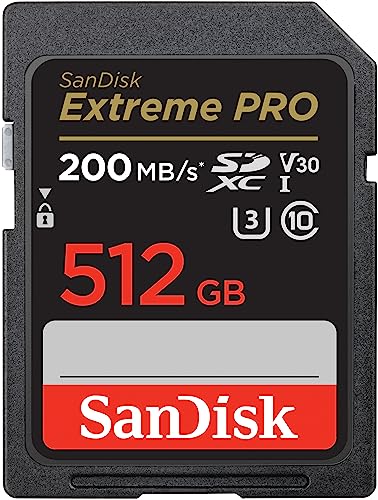

The SanDisk Extreme PRO SDXC is the industry standard for a reason, offering consistent write speeds that handle high-bitrate 4K footage without breaking a sweat. When you are tracking a surfer through a long barrel, you need a card that won’t buffer mid-action. Its reliability in sustained writing makes it a top-tier choice for professionals who cannot afford a stutter during a critical swell.
If you are shooting with a mirrorless camera or a cinema-grade handheld, this card is your most dependable workhorse. It balances high-speed performance with widespread compatibility across almost all modern camera systems. For the surf cinematographer who wants to plug, play, and focus entirely on the lineup, the Extreme PRO is the most logical investment.
Sony TOUGH SF-G Series: Best Rugged Surf Option

When you are working in the splash zone, the Sony TOUGH SF-G series is engineered to survive the environments that kill standard memory cards. These cards are built with a monolithic structure, meaning they lack the fragile ribs and write-protect switches that often break off when you are frantically swapping cards on a wet beach. They are essentially a solid block of resin, making them impervious to drops, saltwater, and bending.
This card is the ultimate insurance policy for those who film from the water or in heavy shore-break conditions. While the price point is higher than standard cards, the peace of mind provided by its ruggedized design is unmatched. If your workspace involves sand, salt, and potential impact, this is the only card you should trust in your primary slot.
Lexar Professional 2000x: Best for Rapid Bursts
The Lexar Professional 2000x is built for the photographer who relies on high-speed continuous shooting to catch the perfect turn. Its UHS-II interface ensures that your buffer clears almost instantly, allowing you to fire off rapid bursts as a surfer approaches the lip. This card is optimized for the high-data throughput required by professional-grade mirrorless cameras.
Because it excels at rapid data offloading, it is also a massive time-saver when you are back at your workstation transferring terabytes of footage. If your workflow involves heavy burst photography alongside video, the 2000x offers a distinct speed advantage. It is a specialized tool for those who prioritize frame-rate performance above all else.
ProGrade Digital V90: Best for 8K Surf Footage

As 8K resolution becomes the new benchmark for surf cinematography, the ProGrade Digital V90 stands out as one of the few cards capable of handling such massive data streams. It features a sustained write speed that prevents the "card too slow" error message that plagues less capable hardware during high-resolution recording. It is designed specifically for the high-end cinema cameras used in modern surf productions.
This card is not for the casual hobbyist; it is for the professional who demands uncompromising quality for large-format displays. Its sophisticated controller technology ensures that data is written efficiently, minimizing the risk of thermal throttling during long recording sessions. If you are shooting 8K, do not cut corners—this is the card that will keep your footage pristine.
Kingston Canvas React Plus: Best Value Reliability

The Kingston Canvas React Plus proves that you don’t always have to pay a premium for professional-grade performance. It delivers impressive V90 speeds at a price point that makes it easier to stock up on multiple cards for long, all-day sessions at the beach. It is a fantastic option for freelancers who need to keep their gear costs down without sacrificing technical capability.
Reliability is the hallmark of this card, consistently performing well even in fluctuating temperatures. While it may lack the extreme "ruggedized" marketing of more expensive brands, it is more than capable of handling the demands of 4K surf video. For the cinematographer who needs a reliable, high-performing card that won’t break the bank, this is your best value play.
Delkin Devices Black V90: Best for Ocean Hazards

The Delkin Devices Black V90 is built with a level of durability that borders on extreme, specifically designed to withstand the harsh realities of the coast. These cards undergo rigorous testing to ensure they can handle high-impact vibrations and extreme environmental shifts. They are essentially the "heavy-duty" option for those who find themselves in the thick of the action.
What sets the Black series apart is its industry-leading warranty and the company’s focus on professional-grade quality control. If you are filming in remote, rugged locations where a card failure could mean losing a season’s worth of work, the Delkin Black is your safest bet. It is a premium product for a high-stakes environment.
Understanding Surf Videography Write Speed Needs
Surf footage is data-heavy because the ocean is rarely static; the constant movement of water creates complex patterns that require high bitrates to render accurately. If your card’s write speed is too slow, your camera will either stop recording or drop frames, resulting in choppy, unusable clips. You need to look for the "V" rating, which denotes the minimum sustained write speed in megabytes per second.
- V30: Minimum for basic 4K, but risky for high-bitrate settings.
- V60: A solid middle ground for most 4K surf projects.
- V90: The gold standard for 8K and high-frame-rate 4K slow motion.
Always check your camera’s manual to see the maximum bitrate it records at. If your camera shoots at 400 Mbps, a V30 card will fail; you need a V60 or V90 to keep up with that volume of data. Never guess your speed requirements—do the math before you hit the sand.
Why V90 Ratings Matter for High-Res Wave Clips
The V90 rating signifies a guaranteed sustained write speed of 90MB/s, which is critical for preventing data bottlenecks. When you are filming in 4K at 120 frames per second, your camera is writing an immense amount of data every single second. A V90 card ensures that this stream is uninterrupted, maintaining the integrity of your high-res files.
Beyond just avoiding errors, V90 cards also facilitate faster data offloading to your computer. When you are filming all day, you don’t want to spend hours waiting for files to transfer. A V90 card significantly reduces your post-production downtime, allowing you to get to the edit faster.
Protecting Your Memory Cards from Saltwater Spray
Saltwater is the silent killer of electronics, as even a microscopic amount of salt residue can corrode internal contacts over time. Always keep your memory cards in a hard-shell, moisture-resistant case when they are not inside your camera. Avoid swapping cards on the beach if it is windy, as salt spray can easily settle on the card’s pins.
If a card does get exposed to salt, do not attempt to clean it with water or chemicals. Use a dry, lint-free microfiber cloth to gently wipe the contacts, or better yet, use a specialized electronic contact cleaner. Prevention is your best defense, so treat your cards with the same care you would give your camera body.
Essential Data Management for Surf Cinematography
The best way to manage surf footage is to adopt a "one-card, one-session" philosophy. By limiting the amount of footage on a single card, you minimize the risk of losing a massive amount of work if a card fails or is lost in the surf. Once you finish a session, back up your files to two separate drives immediately—one for working and one for long-term archival.
Develop a clear naming convention for your folders based on the location and date. Surf footage can quickly become unmanageable if you don’t organize it as soon as you get home. By treating your data with the same discipline as your filming, you ensure that your best wave clips are always accessible and secure.
Investing in the right memory card is a vital step in elevating your surf cinematography from amateur clips to professional productions. By matching your card’s write speed to your camera’s demands and prioritizing rugged durability, you can focus on the action rather than the equipment. Choose your gear wisely, keep your data organized, and get back out to the water to capture the next great swell.